Mac system sounds
The system is
talking. Quietly.
macOS has a small, fixed set of sounds it plays — the alert beep, the screenshot shutter, the Trash crumple, the startup chime — and a much longer list of things it does in total silence. Waking. Sleeping. Locking. Mounting a drive. Finding a display. Losing the network.
This page covers both halves: what you can change in System Settings without installing anything, and the 26 events Noisy Laptop can give a sound to, with what each one actually means. No claims about sounds the app doesn't control.
Free forever for the charger sounds. macOS 14 Sonoma or later · Apple Silicon or Intel.
Before you install anything
What macOS already lets you change
Two of these are genuinely adjustable, and worth doing first if they're what you came for.
The System group
Nine moments in the life of a Mac
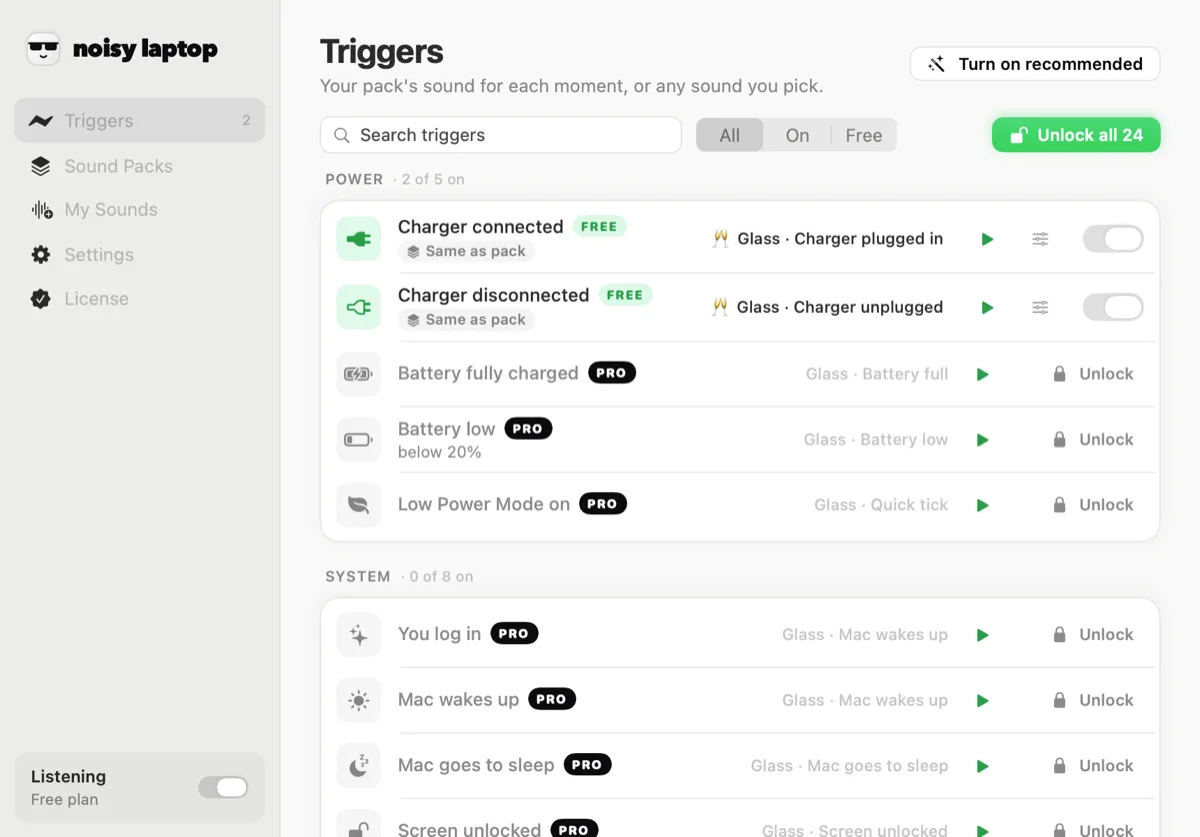
These are the events in the app's System group. Each one is a notification macOS already broadcasts; the app subscribes and plays your clip. What each one really means matters, because a few of them fire at moments you wouldn't guess.
Mac starts up
Wake / start up · on by defaultFires when you log in, not at the chime. It only counts if the app started within a few minutes of boot or as a login item, so relaunching it midday stays quiet.
Mac wakes up
Wake / start up · on by defaultOpening the lid or nudging a sleeping Mac. The one you hear most often, so it should be the shortest sound you own.
Mac goes to sleep
Sleep · off by defaultThe lid closing, or the display timing out into sleep. A warm descending note here is oddly satisfying. Off by default.
Screen unlocked
Unlock · on by defaultYou typed your password or your Watch did it for you. Distinct from waking: the Mac may have been awake the whole time.
Screen locked
Lock · off by defaultControl-Command-Q, or the Apple menu's Lock Screen. Useful in an office: an audible “I've locked it” as you stand up.
Dark / Light mode
Little things (Spaces, apps) · off by defaultmacOS flipping between Light and Dark, whether you did it or the schedule did. A tiny tick suits this better than a fanfare.
Switched Space
Little things (Spaces, apps) · off by defaultSwiping between desktops. Fires only when you switch, not when macOS follows an app you just opened.
On the hour
On the hour · off by defaultA short musical signature on the hour, like a mantelpiece clock. Off by default, and the most divisive thing in the app.
App opened
Little things (Spaces, apps) · off by defaultAny app opening. A one-click tick is the only sensible choice here, unless you enjoy chaos.
Listen
What a system moment can sound like
The same event, played by six packs with very different manners. For everyday system events the restrained packs usually win — you hear these ten times a day, not once.
The first thing you hear each morning. Bright, and over in well under a second.
Classic is free. The first two are the restrained end of the library; the last two are the ones to save for the charger.
And the rest
Devices, network, power and calls
“System sounds” usually turns out to mean the whole machine, not just the System group. Here is every event the app knows about, what it plays and whether it's on when you install it.
A few worth calling out. Display connected is the one desk-setup people switch on first — you hear whether the monitor woke up without leaning round it. USB device in covers card readers and drives, which is how you learn that a hub port has died. Low Power Mode ticks when macOS switches it on for you at 20%, which is otherwise entirely invisible.
Power events have their own page: the charging sound, which is also the free part of the app.
Tuning
Per-event volume, and a master over the top
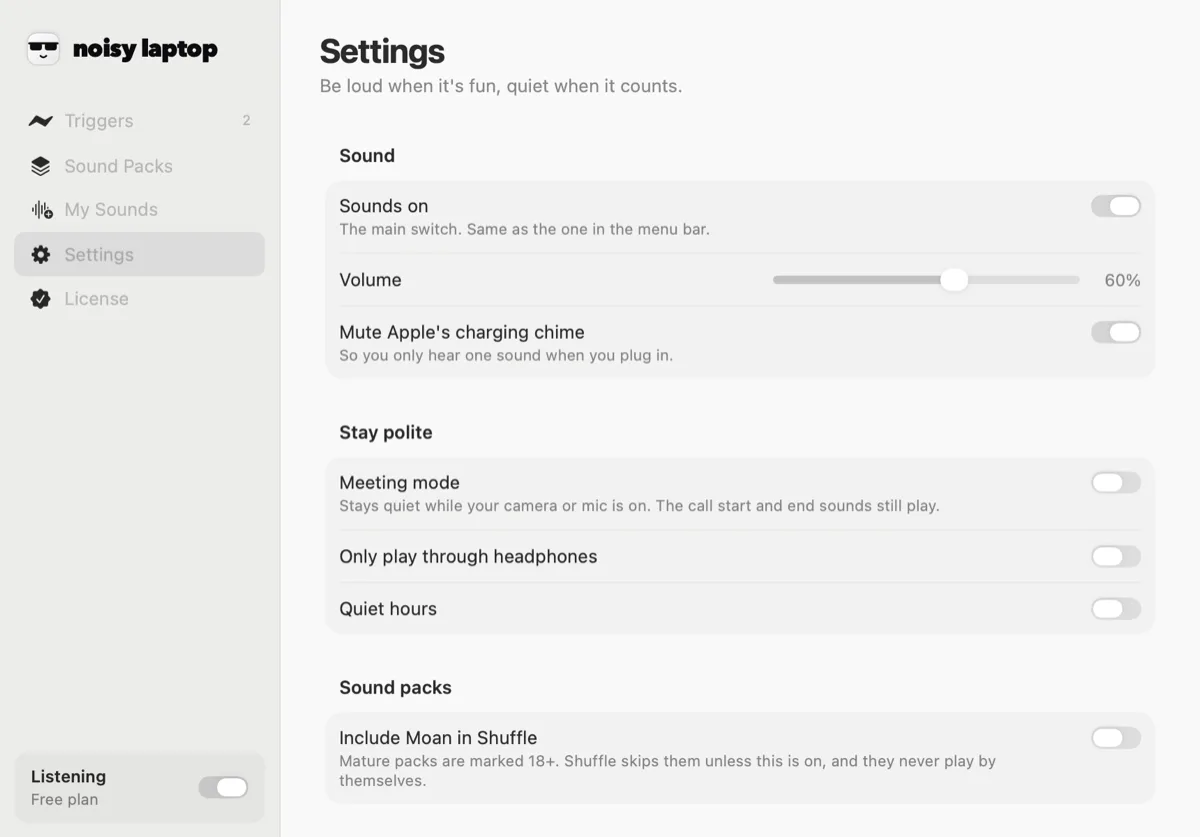
Every trigger has its own volume as well as its own sound, which matters more than it sounds like it would. A wake sound wants to sit under a room; a battery-low sound wants to sit above one. Set them separately and the whole thing stops feeling like an app and starts feeling like your machine.
Above that is a single master volume, plus mute and pause in the menu bar. The battery-low threshold lives here too, so you can be warned at 30% instead of 20%.
Settings also has a section called Stay polite: meeting mode (on by default — silent while your camera or mic is in use), optional quiet hours between times you choose, and a switch that only plays sounds when headphones are connected.
There is a cooldown on every event, and device and network events are deliberately ignored for a few seconds after your Mac wakes — that flurry of reconnections is macOS, not you, and hearing eight sounds when you open the lid would be miserable.
System questions
What people ask
What can trigger a sound?
26 Mac events, in six groups: Power, System, Devices, Network, Apps and Calls. Each one can be switched on or off on its own, and each one gets its own sound. The full list is on Mac system sounds.
Does it run in the menu bar?
Yes. It's a menu-bar app with no Dock icon (LSUIElement, if you like that sort of detail). The menu shows what it last played and lets you mute, pause for a while, switch packs or open the main window.
Does it need Accessibility permission?
No. It never installs an event tap or a global key monitor. It listens to notifications macOS already broadcasts — power source, sleep and wake, screen lock, device connections, network reachability, app launches — and none of those sit behind a permission prompt.
Will this get annoying?
It's built so it doesn't. Only 13 of the 26 events are on to start with, each has a cooldown, and device and network events are ignored for a few seconds after your Mac wakes — that burst is macOS reconnecting, not you.
There's also a whole Settings section for this. Meeting mode is on out of the box and keeps the app quiet whenever your camera or microphone is in use. Quiet hours silences it between times you set. Only play through headphones does what it says. And the menu bar has a mute and a pause.
Which versions of macOS are supported?
macOS 14 Sonoma or later · Apple Silicon or Intel. It's a universal build, so it runs natively on Apple Silicon and on Intel Macs. There's no version for macOS 13 or earlier.
Is Noisy Laptop free?
The download is free and stays free. Free covers Charger connected and Charger disconnected with the Classic pack — no time limit, no account, no nagging. Pro is a one-time $6.99 for the rest. What's in each.
Keep going
Related
- Charging soundThe power events in detail, and the two triggers that are free forever.
- Notification soundsWhat you can and can't change about the sounds macOS plays with banners.
- Your own audioIf you want your Mac's wake sound to be your own voice, this is how.
- Sound packsTwelve ready-made sets, with Classic filling in whatever a pack skips.
Give the quiet events a voice.
Install it, turn on the four you care about, and leave the rest off. It's a menu-bar app; you'll forget it's there apart from the sounds.
macOS 14 Sonoma or later · Apple Silicon or Intel · Noisy Laptop Pro is $6.99, once, if you want the rest.