As seen on TikTok
Make your laptop
moan when you plug it in.
You've seen the video. Somebody plugs a charger into a MacBook and the laptop makes a noise it has absolutely no business making. Everyone in the room reacts. The comments are all some variation of “how”.
The answer is boring in the best way: there's no hack, no jailbreak and no terminal command. Your Mac announces that it started charging; a small menu-bar app hears that announcement and plays whatever sound you've chosen. Choose that sound, and there it is, every single time.
Setup takes about two minutes. The charging trigger itself is free.
Preview
Hear it before you commit
Nothing plays until you press it. It is exactly as advertised, so: headphones, or check who's behind you.
Moan pack · adult humor · never the default
The premise
What the “laptop moan” actually is
Strip the comedy away and it's a notification sound attached to an unusual event, which is why it lands. Your brain expects plugging in a laptop to be silent, or at most a polite chime. It is neither.
The joke works because of timing, not the sound itself. The charging event fires the instant the connector seats — not a second later, not when macOS gets round to it — so the noise is locked to the physical act of pushing the cable in. That tight sync is what makes people jump, and it's why a version done by hand (playing a file yourself, or a Shortcut on a timer) never gets the same reaction.
The second thing people miss is the unplug. The Moan pack has a separate, deflated sound for the cable coming out, and in practice that one gets a bigger laugh than the first. It's the punchline the videos usually cut before.
And the third: it's not one recording. Every moment in the pack has two takes, and the app alternates between them rather than repeating the last one. So it doesn't become a ringtone you can predict.
The mechanism
Why the charging trigger is the whole trick
Worth understanding, because once you get it you'll think of six more things to do with it — most of which are more useful and less likely to go off in a lecture.
Do it
Four steps to a laptop that moans
No terminal, no permissions, no restart. If you have the .dmg open, this takes about two minutes.
- Step 1
Install it
Download the .dmg, drag Noisy Laptop to Applications and open it. It appears in the menu bar. Nothing asks for a permission. - Step 2
Unlock Pro
Moan is one of the Pro packs — $6.99, once. The free tier covers the charging trigger itself with the Classic pack, so you can confirm everything works before paying. - Step 3
Select the Moan pack
Open Sound Packs and choose Moan. It's flagged as adult humor, so the app makes you pick it deliberately — it's never a default. - Step 4
Plug your charger in
That's it. “Charger connected” is on out of the box, so the moment you plug in, it happens.
Two minutes. One very confused colleague.
Download Noisy Laptop free, check the charger trigger works with the Classic pack, then switch to Moan when you're ready. Headphones first, ideally.
macOS 14 Sonoma or later · Apple Silicon or Intel · Noisy Laptop Pro is $6.99, once, if you want the rest.
Read this bit
How not to get yourself in trouble
It is genuinely funny and it will genuinely go off at the worst possible moment, because the worst possible moment is exactly when your battery dies. A short list from people who learned the hard way.
Meeting mode has your back
It's on by default: the app stays quiet the whole time your camera or microphone is in use. Plugging in mid-call is the disaster everybody imagines, and it's the one case already handled.
Turn on quiet hours
Settings has an optional window — silent between the times you pick. Late-night charging in a shared flat is exactly what it's for.
Or headphones only
One switch: sounds play only when headphones are connected. This is the setting to use if you take your laptop anywhere near other people.
Pause covers the rest
The menu bar has a pause that turns itself back on after an hour, so you don't spend a week wondering why the app went silent.
Turn the trigger volume down
Every event has its own volume. At 30% it's a private joke rather than a public one.
Keep a second pack ready
Switching packs is one click in the menu bar. Moan at home, Classic at work, and nobody has to have a conversation about it.
The rest of the pack
It's not only the charger
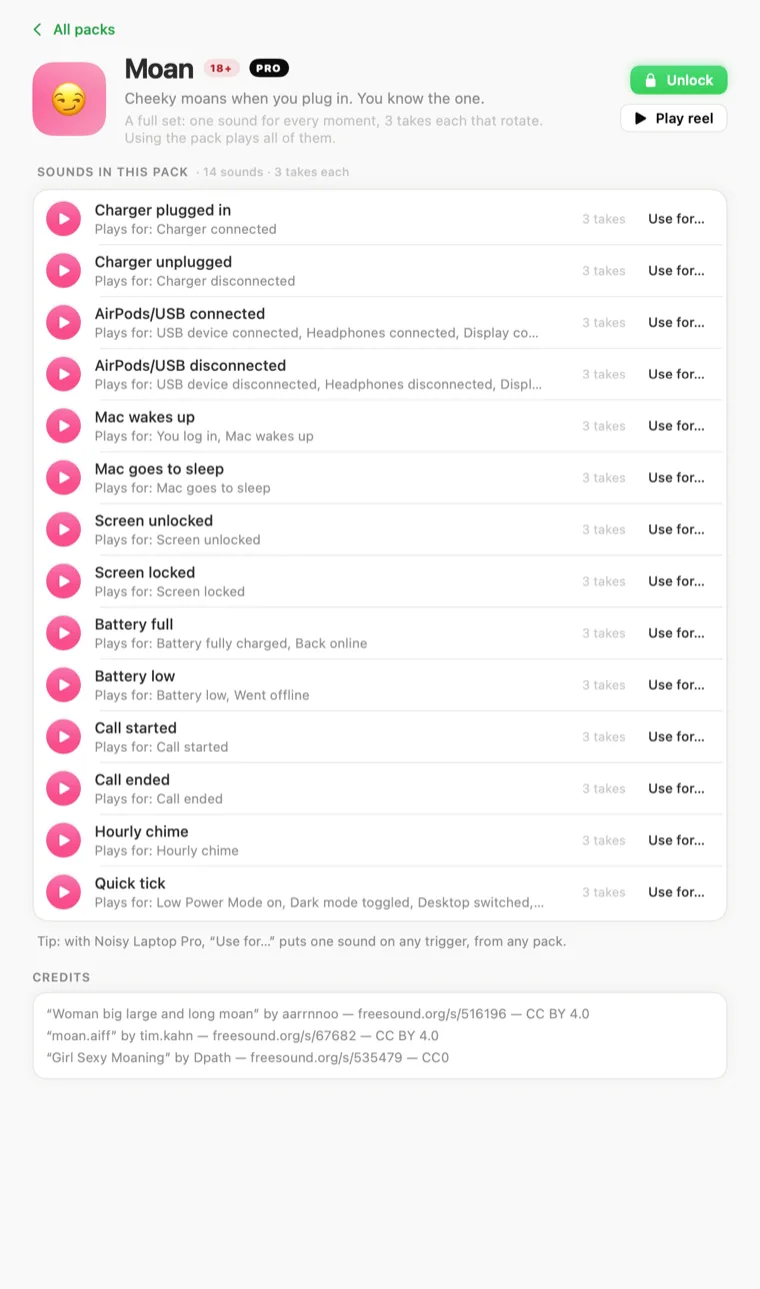
Press any of these. They're the everyday moments, done in the same register — which is either the best or the worst thing you've read today.
If that's not your thing
Charger sounds that get a laugh without the HR risk
Same trigger, same two-minute setup, very different phone call afterwards. All of these are real pack clips — press them.
And if the sound in your head isn't in any pack, you can supply the file yourself — the app takes m4a, mp3, wav, aiff and caf.
Moan questions
What people ask
Is the moaning charger sound real?
Yes — it's the Moan pack. Cheeky on plug-in, giggles and sighs for everything else. It's flagged as adult humor in the app, it's never the default, and it only plays if you pick it. Hear it and set it up.
How do I change the sound my Mac makes when it starts charging?
macOS has no setting for this, so you need a small app that watches the power source. Install Noisy Laptop, open Triggers, and pick a sound for “Charger connected”. The next time you plug in, that's what plays. Both charger triggers are free — see MacBook charging sounds.
Is Noisy Laptop free?
The download is free and stays free. Free covers Charger connected and Charger disconnected with the Classic pack — no time limit, no account, no nagging. Pro is a one-time $6.99 for the rest. What's in each.
Will this get annoying?
It's built so it doesn't. Only 13 of the 26 events are on to start with, each has a cooldown, and device and network events are ignored for a few seconds after your Mac wakes — that burst is macOS reconnecting, not you.
There's also a whole Settings section for this. Meeting mode is on out of the box and keeps the app quiet whenever your camera or microphone is in use. Quiet hours silences it between times you set. Only play through headphones does what it says. And the menu bar has a mute and a pause.
Can I use my own sounds?
Yes, with Pro. The app has a My Sounds pane: drop in m4a, mp3, wav, aiff or caf files and they show up in the sound menu for any trigger, alongside the packs. Clips are copied into ~/Library/Application Support/Noisy Laptop/CustomSounds/ and never leave your Mac. More on using your own audio.
Does Noisy Laptop work on a MacBook?
Yes. It runs on any Mac on macOS 14 Sonoma or later · Apple Silicon or Intel. The charger, battery and sleep/wake events are the ones laptop owners notice most; on a Mac mini or Studio the charger triggers just never fire, and everything else works the same.
Keep going
Related
- MacBook charging soundsThe same trigger, seven other sounds, and the free tier explained.
- Your own soundsRecord it yourself. m4a, mp3, wav, aiff or caf, on any event.
- All twelve packsEverything from crystal clinks to a farmyard of quacks, playable on the page.
- Mac sounds, explainedThe overview: what your Mac can and can't be made to say.
Go on, then.
Free to download, free to test with the charger trigger, and about two minutes from here to a laptop that reacts to being plugged in.
macOS 14 Sonoma or later · Apple Silicon or Intel · Noisy Laptop Pro is $6.99, once, if you want the rest.