Custom Mac sounds
Your clip.
Your Mac's moment.
Most searches for custom Mac sounds land on a library of WAV files to download. That's the easy half. The hard half — the reason those files sit in a folder forever — is that macOS gives you almost nowhere to put them. There's a slot for the alert sound and that's about it.
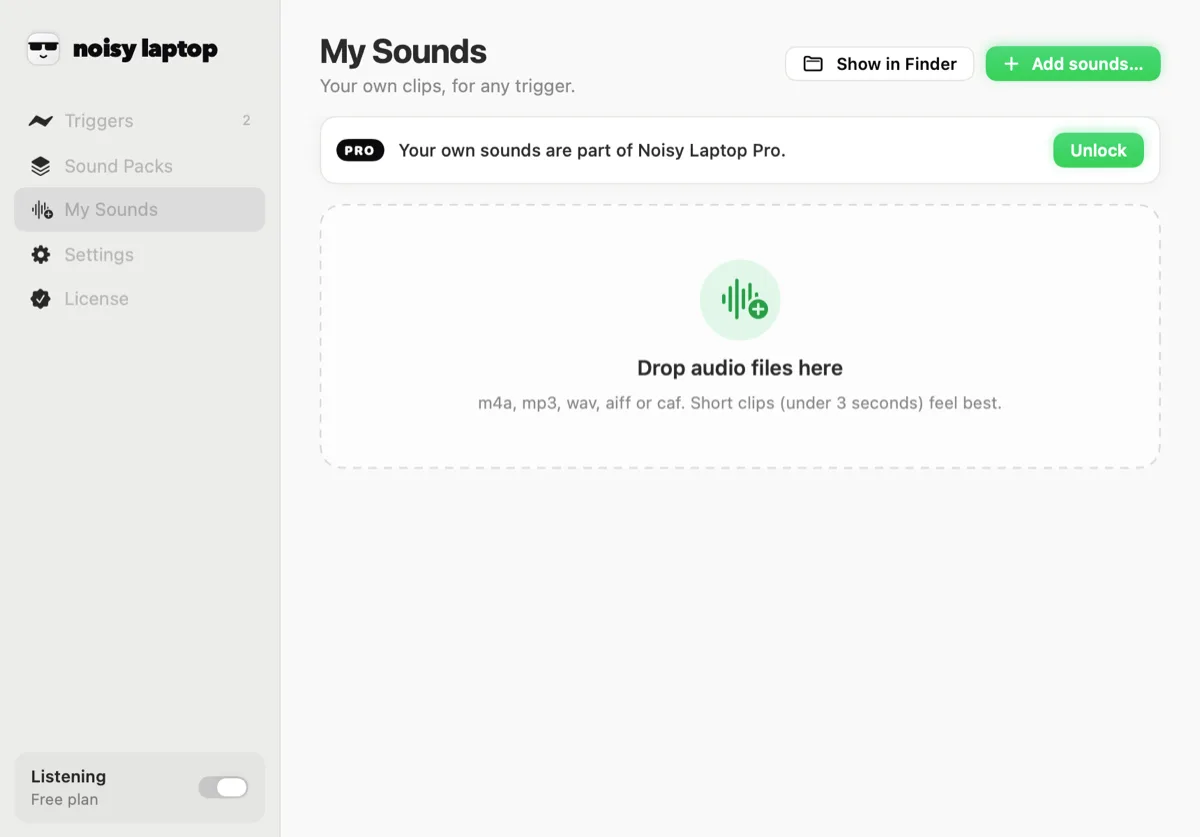
Noisy Laptop is the other half: a menu-bar app where every Mac event has a sound menu, and your own files sit in that menu next to the built-in packs. Your voice when the Mac wakes. A four-second sample when you plug in. A sound your friend sent you, on AirPods connecting.
Your own sounds are part of Noisy Laptop Pro · $6.99 once.
Before you install anything
Hear your own clip, right here
Hear your own clip first
Drop an audio file here (or pick one) to hear how it lands as a one-shot. It stays in your browser: nothing is uploaded, and nothing is saved.
m4a, mp3, wav, aiff or caf.
This is the honest test: a sound that's funny once is torture on the fortieth plug-in. Play your candidate three or four times in a row. If you're still smiling, it's a keeper.
The file you picked stays in your browser — it's read locally and never uploaded. The Mac app works the same way: your clips are copied into its own folder on your disk and go nowhere else.
The practical bits
What the app accepts, and where it puts things
No conversion step, no naming convention, no manifest to edit. Drag the file in and it's there.
Doing it
From a file on your desktop to a sound on an event
Four steps, and the only one that takes any thought is the last one.
- Step 1
Trim it first
Any audio editor, or QuickTime's trim. Cut the silence off the front — a clip that starts 200 ms late feels broken rather than late. - Step 2
Open My Sounds
The main window has a My Sounds pane. Drag your files onto it, or use “Add sounds…”. They're listed with a play button each. - Step 3
Go to Triggers
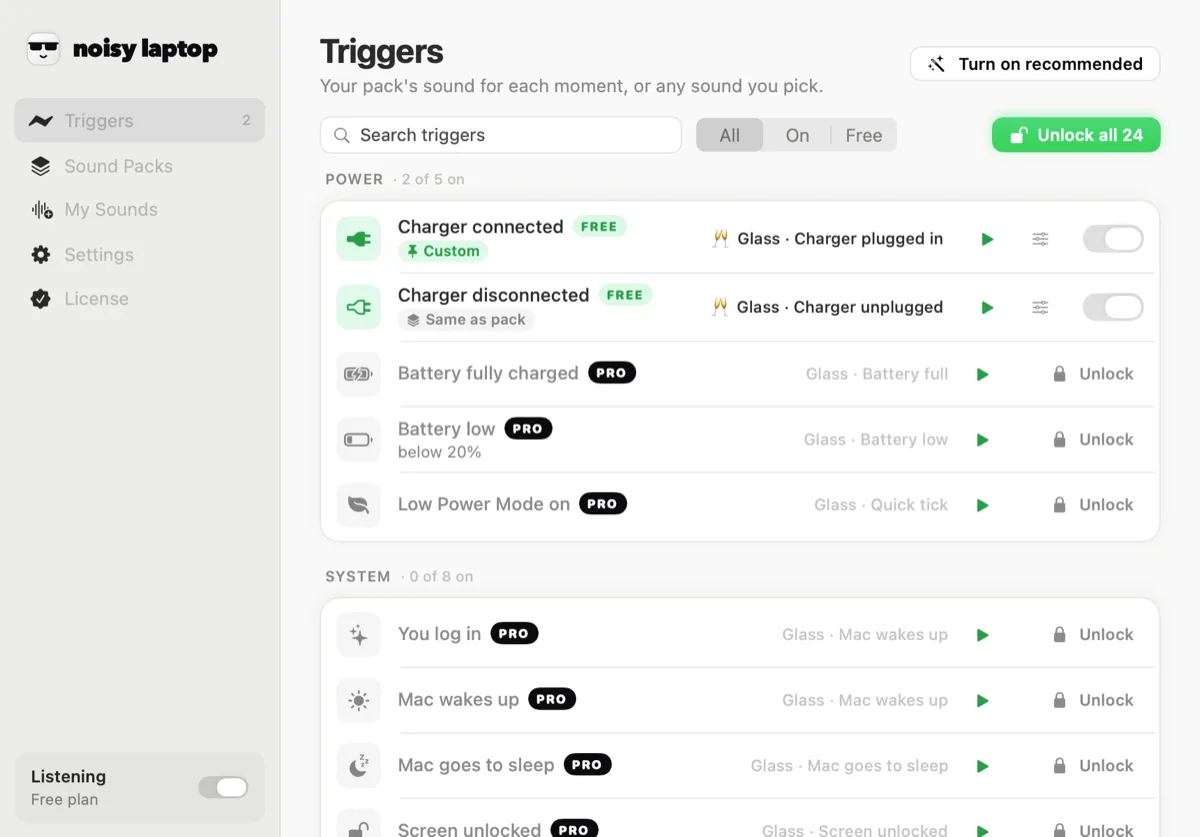
Find the event you want. Open its sound menu — your clips are listed under the packs, by file name. - Step 4
Pick it, then live with it
Set that trigger's volume too. Give it a day before deciding; most people swap their first custom sound within about an hour.
What people actually use
Ideas that survive past the first day
Grouped by the kind of thing, with the event that suits it. The short ones win.
A voice
Someone in your house saying one word. Two syllables maximum. On wake, this is the single most-loved custom sound people report — and the one most likely to make you laugh at 8am.
Good on: Mac wakes up
A meme you're not sick of yet
The ones that last are short and percussive rather than a whole punchline. If it needs three seconds of setup, it's a video, not a trigger sound.
Good on: Charger connected
Something you made
A bar from a track you're working on, a synth patch you like, a drum you recorded. Hearing your own work on a plug-in is quietly motivating.
Good on: Charger connected
A real object
Record a lighter, a stapler, a can opening, your actual front door. Real foley sits into a room better than anything synthetic.
Good on: USB device in
A game sound from something you own
A pickup, a menu blip, a save chime. Nostalgic, tiny, and already designed to be heard a thousand times without wearing out.
Good on: AirPods connected
Deliberate silence
Not everything needs a sound. Leaving an event off is a legitimate choice, and the app is built on the assumption that most of them will be.
Good on: Anything
Matching sound to moment
Which events are worth a custom clip?
All 26 of them accept one, but they don't all deserve one. A rough guide, by how often you'll hear it.
If you'd rather not build a set one file at a time, the twelve sound packs already cover the moments they do best, with the free Classic pack filling in the rest — and you can mix: a pack for everything, your own clip on the one event you care about.
Mixing
Pack clips are worth stealing for the boring events
Custom sounds aren't all-or-nothing. The usual arrangement after a week or two: your own clip on the charger, and a pack handling the eight events you don't want to think about. The events below are ones that reward a well-made short sound more than a personal one — press them and see whether you'd really do better yourself.
Custom sound questions
What people ask
Can I use my own sounds?
Yes, with Pro. The app has a My Sounds pane: drop in m4a, mp3, wav, aiff or caf files and they show up in the sound menu for any trigger, alongside the packs. Clips are copied into ~/Library/Application Support/Noisy Laptop/CustomSounds/ and never leave your Mac. More on using your own audio.
Is Noisy Laptop free?
The download is free and stays free. Free covers Charger connected and Charger disconnected with the Classic pack — no time limit, no account, no nagging. Pro is a one-time $6.99 for the rest. What's in each.
Is it a subscription?
No. Pro is $6.99 once — a personal licence for the Macs you own, with free updates for version 1. No renewal, no account.
Will this get annoying?
It's built so it doesn't. Only 13 of the 26 events are on to start with, each has a cooldown, and device and network events are ignored for a few seconds after your Mac wakes — that burst is macOS reconnecting, not you.
There's also a whole Settings section for this. Meeting mode is on out of the box and keeps the app quiet whenever your camera or microphone is in use. Quiet hours silences it between times you set. Only play through headphones does what it says. And the menu bar has a mute and a pause.
How do I uninstall it?
Quit it from the menu bar and drag Noisy Laptop out of Applications. Its settings live in your preferences and your own clips in ~/Library/Application Support/Noisy Laptop/, which you can delete as well. If you have Pro and you're moving to a different Mac, deactivate the key from the License pane first.
Which versions of macOS are supported?
macOS 14 Sonoma or later · Apple Silicon or Intel. It's a universal build, so it runs natively on Apple Silicon and on Intel Macs. There's no version for macOS 13 or earlier.
Keep going
Related
- Charging soundThe event most custom clips end up on, and the free part of the app.
- Sound packsTwelve ready-made sets, if you'd rather not curate fourteen clips yourself.
- System soundsEvery event you can point a clip at, with what each one really means.
- Free vs ProCustom sounds are the Pro half. Here's exactly what that costs and covers.
Bring your own noise.
Download it free and try the charger sounds first. When you want your own clips in there, Pro is $6.99, once.
macOS 14 Sonoma or later · Apple Silicon or Intel · Noisy Laptop Pro is $6.99, once, if you want the rest.